XR's Use May Be Like a HUD — Let's Cook with AI
I borrowed an inmo XR, an Android-based XR headset, from Ukai (known from Mitou Junior) and did a small hackathon. After struggling to find a use, I built an AI-powered cooking assistant to enjoy cooking with an AI. Here I introduce my attempt to cook with AI using the XR glasses.
Today I made a teleprompter app that stylishly displays Google Slides speaker notes for the Inmo Air 3 — the glasses from @inmoxreality that run Android and that I bought in Shenzhen. It's fun and seems immediately practical. (In reality, it's floating in the air with AR glasses and looks insanely cool, but it's painful that there's no easy way to show this.) pic.twitter.com/lEd14WBgBW
— Yu Ukai (@ukkaripon) January 12, 2026
Today I got to try the inmo XR — an Android-powered XR headset that Ukai (well-known from Mitou Junior) brought — and I spent some time thinking about products that could make good use of it.
Exploring the potential of inmo XR
I also own an XREAL One lens and wondered whether it could do similar things. Basically, I mostly use my XREAL like a mobile monitor, so honestly I didn’t feel much need to build apps specifically for this kind of device. Making a custom UI or hunting for APIs is a hassle.
However, after actually using inmo XR, the fact that it’s cable-free and standalone is a huge advantage. For developers, that opens up many possibilities, and I felt that more devices like this will appear in the future.
Unlike XREAL’s approach, inmo XR is extremely thin and less noticeable (though it still feels a bit odd), and judging just by the thinness and performance of the glasses portion, I thought: is this an upper-tier replacement for Even Realities?
(If you want a recommendation on Even G1, denshi-neko has a good introduction:) https://note.com/electrical_cat/n/ncbff77528ada
I don’t know if inmo XR is the absolute best (I only compared it with XREAL), but it feels that it’s come far enough to be actually usable. There are issues — heavy operations make the area around the ears heat up ridiculously, and as is common with Chinese devices, the Play Store might not work and related services can be unavailable. Maybe there’s a way to unlock that, though.
The display itself is interesting: XREAL uses something like a birdbath optical system, placing a triangular (semi-reflective) mirror right where it almost touches the eye to deliver the image, but inmo XR uses a different method — some mysterious technology delivers a super-thin image to the eye. How to describe it… a thin few-millimeter eyeglass lens has mirrors embedded, and you can see an image from the side… (my vocabulary fails me).
Because it’s Android, an operation method equivalent to a mouse was needed. As a result, inmo XR has a touchpad-like device and a ring-like device you wear on your finger (probably also a touchpad).
Weaknesses of current wearable devices
Separately, I recognized common issues shared by inmo XR and other devices.
Most high-function XR glasses end up heavy, and I personally can’t wear them daily. There are lightweight, purpose-limited devices like Even G1/G2, but devices that do things like display in Full HD or have Android built-in tend to be heavy and cause eye strain. Also, with about 0.7 eyesight, I need insert lenses. Some say “just use contacts,” but putting foreign objects into your eyes and doing that every day is scary… Still, humans might need to endure some discomfort to adapt to machines, I guess.
From a developer’s perspective, I’m happy with high-performance devices, but in daily use they can be exhausting.
That said, I think this problem will be solved fairly soon — as time goes on, they’ll get smaller.
What to build
I thought about what to build, but since it was supposed to be a quick one-day hackathon, I ignored the inmo XR’s biggest advantages — that it runs Android and exposes device APIs. Instead, I focused on its high screen transparency, which makes it usable like a HUD, and the fact that it’s cable-free increases usable scenes.
Recently with XREAL I ran into a problem… oh yeah.
So I made an AI app that helps with cooking.
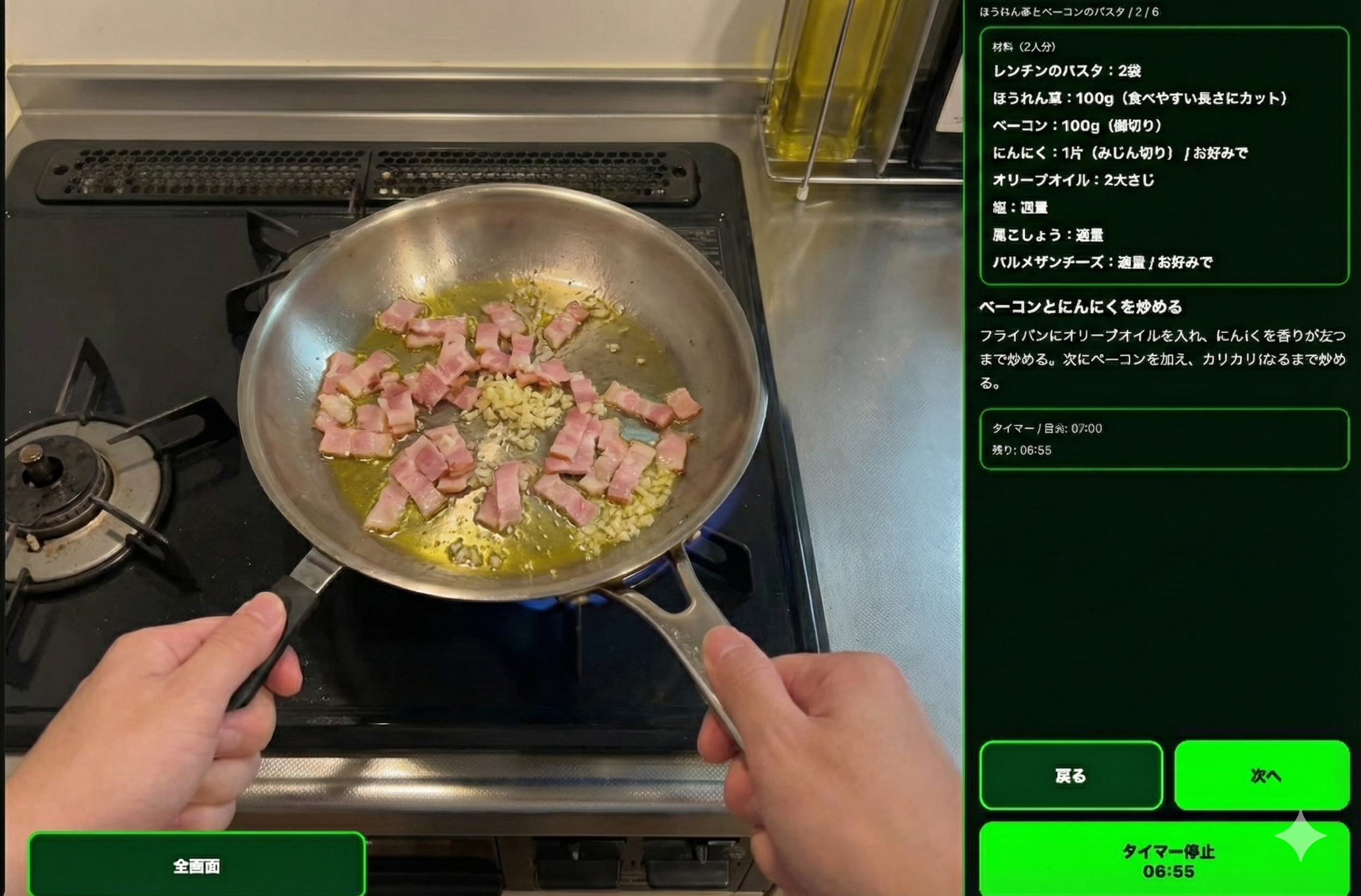 (Concept image by Gemini)
The idea is simple. You tell the app what you have at home or what you want to make, and the AI generates a “recipe.json” (lol), and the system follows that. With inmo XR, for better or worse, black becomes transparent (XREAL is similar but inmo XR is even more transparent), so I leverage that characteristic.
Previously, a prototype at this level that could be used as a product might have taken at least a week to build. But using LLM coding tools (like Cursor), it can be done in a day or even half a day.
What people currently need is the skill to supervise the AI — to watch if it seems to work, whether it will finish successfully, to monitor the AI’s actions, decide if corrections are needed, and if so, at what point to interrupt and make corrections.
I built a quick demo, so please try it out (I’m paying for the LLM usage, so I might have to stop if I can’t afford it).
Design choices
Text in XR can be slightly hard to read, so I made the buttons huge. They look ridiculous on a PC, but they’re surprisingly just right in XR.
Also, initially the buttons were dark, but the darker they are the more transparent they become (same as movie theater projectors), so I changed the buttons to green so they’re visible in bright environments. That makes them easiest to see. Maybe that’s why movie HUDs are green.
I also needed to reduce the number of buttons. The demo has several buttons, but ultimately I want to control it by head movements (like nodding for the next page). You don’t want to touch the touchpad with hands covered in raw meat while cooking. To remove buttons in the future, I limited the maximum number of buttons to four and also support voice input for text fields.
Other things I want to build
If glasses become extremely capable with a wider field of view, I’d like them to recognize real-world objects and render overlays based on their spatial relationships.
Sure, you can already do this with approaches like Vision Pro that capture video with a chip, but if it can be done in a lightweight glasses form factor, it’d probably be more socially acceptable (at least more than Vision Pro) and cheaper.
Trying it while cooking
If Ukai is around he’ll lend me the inmo XR, but since I don’t have one at home I tried cooking with XREAL and a smartphone instead. However, color reproduction changes quite a bit and you need to route cables from the ears to connect to a PC or phone, so practicality is questionable.
I’ll try it next time I cook, and if it looks promising I’ll add notes.
0 people clapped 0 times
Related articles
💻 Let's Try Team Development on GitHub
Let's Try Team Development on GitHub
For those of you who have registered an account on GitHub but haven't used it because you're not a developer, I've written a brief article explaining how to use it.
🤖 Let's Read Google Sheets via API!
Let's Read Google Sheets via API!
This is a re-publication of an article I wrote on another site last year.
It's super easy. I'll...
🗓️ Thoughts on Life Logging Systems
Thoughts on Life Logging Systems
With the advancement of LLMs, it has become easier to verbalize human behavior and analyze conversations with others. However, I felt that none of it quite fit, so I thought about various aspects from both technical and usability perspectives.
✒️ Markdown Syntax Cheat Sheet (Super Simple)
Markdown Syntax Cheat Sheet (Super Simple)
If you've used Google Docs or Word, you can select bold, italic, headings and so on like...