I Want to Incorporate LLM into Visual Programming (Blockly × LLM)
Hello everyone. My name is Sousei Tokumaru, also known as Sōmame. About a year ago, I became deeply fascinated with web application development using Typescript and React, and I am currently creating a web application called “TutoriaLLM”, which incorporates visual programming, AI interactions, and real-time code execution features.

Since the beginning of this year, I have been developing “TutoriaLLM”. While it’s the first serious app I have created, I am happy to say that it has been selected for Unexplored Junior 2024 and has won the AI development category at App Koshien 2024.
However, although I have participated in several external contests, I have not had many opportunities to explain the details of each feature. So today, I would like to think about incorporating LLM into programming education using block programming.
I would like as many people as possible to see this, so I will omit the program descriptions. If you are curious about the details, please feel free to ask me directly or refer to the GitHub repository. (I might write more detailed articles if there is demand.) https://github.com/TutoriaLLM/TutoriaLLM
Incorporating LLM into VPL
VPL (Visual Programming Language) is often associated with the education of programming beginners. Recently, as the accuracy of LLMs has improved, some people might consider incorporating LLMs into VPL as well. https://zenn.dev/yutakobayashi/articles/blockly-openai For example, in this demo developed by Yuta, it is possible to create programs directly within a workspace of Blockly, which is developed by Google. The VPL×AI system of TutoriaLLM that I will introduce today is quite inspired by this.
Issues Encountered
However, while the aforementioned demo is well-received by general developers (I am one of them), user tests showed that it was not very effective for children. Similar to GitHub Copilot, when LLMs are used to create programs directly, humans tend to write less code, and especially with children, they can overly rely on it. This leads to a mentality of “If AI can write a better program than me, I’ll let it handle everything!” I am someone who heavily relies on Copilot, so I cannot deny it, but for the sake of discussion, let’s treat it as a negative that children can stop thinking and delegate all tasks to AI.
Encouraging User Interaction
Therefore, in TutoriaLLM, we developed a system that highlights blocks and directly suggests blocks to encourage users to actually engage by moving their hands while AI provides assistance.
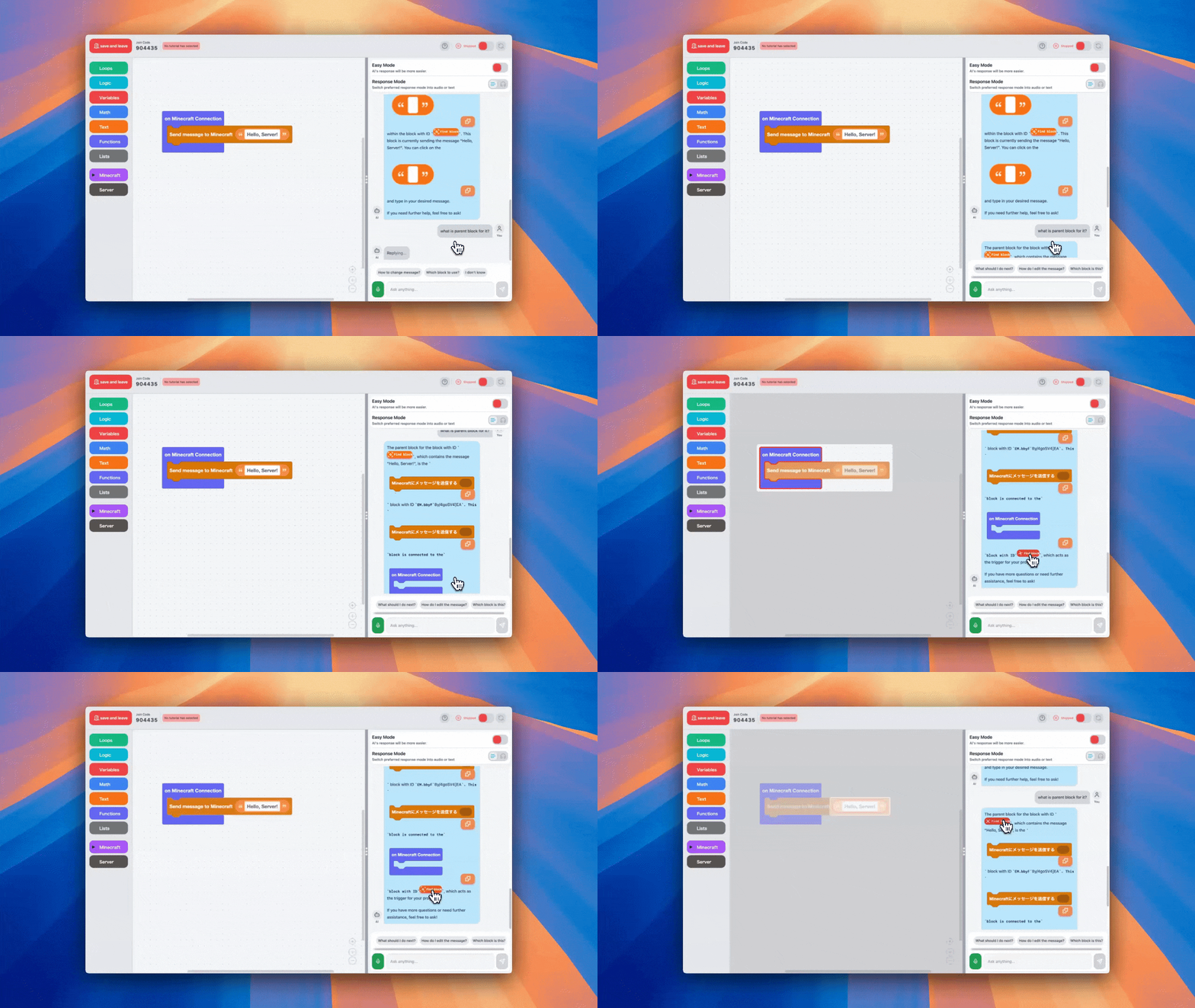 AI Highlighting Blocks
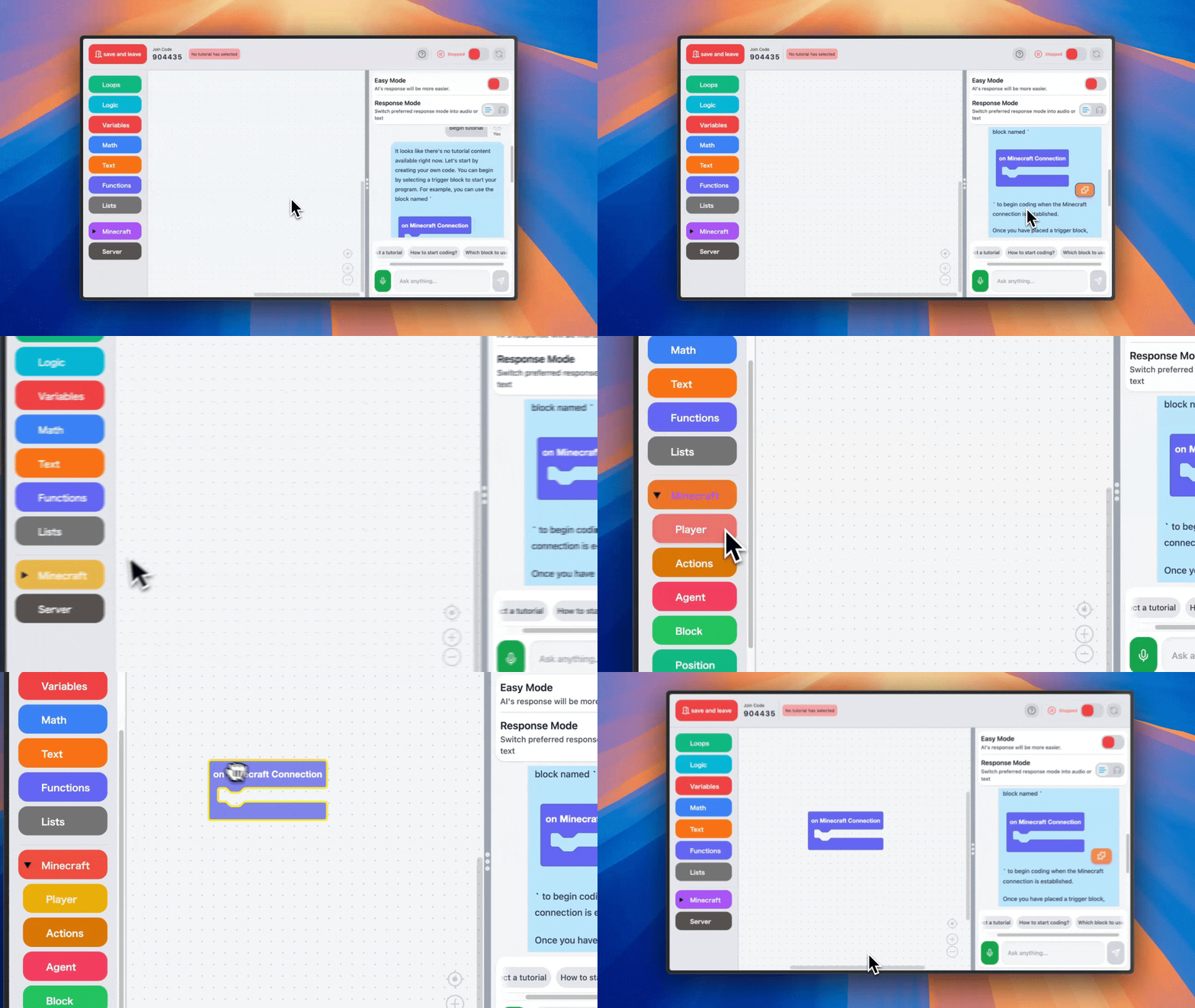 AI Block Suggestions
Although we have not been able to conduct large-scale testing yet, at least users will now need to move their hands. In fact, I used to teach programming classes, and I taught students step-by-step how to create programs like this. LLM is very good at mimicking human behaviors and speech, so it works well even when teaching step-by-step.
Implementation
Both the block highlighting and block suggestions use a slightly modified version of the framework providing visual programming, called Blockly. With Blockly, the contents of the workspace can be dynamically retrieved. Additionally, accessing the contents of the toolbar can also be done easily with slight modifications.
The contents of the Blockly workspace can be serialized, allowing for saving in JSON or XML formats. In TutoriaLLM, we use this JSON for processing. For highlighting, we handle it by directly drawing SVGs within the workspace. You should be able to find information on this through research.
Toolbox reading can be done using the methods provided by Blockly. For collapsible toolboxes, we highlighted all categories in the hierarchy until we discovered a matching category by searching to the lowest level.
Then, using these technologies, we analyze responses from LLMs and respond to the frontend with anything like block highlights or suggestions, making it available for users.
Initial Stage
In the initial stage, responses like the one in the image were returned. The AI could specify one block for each message.
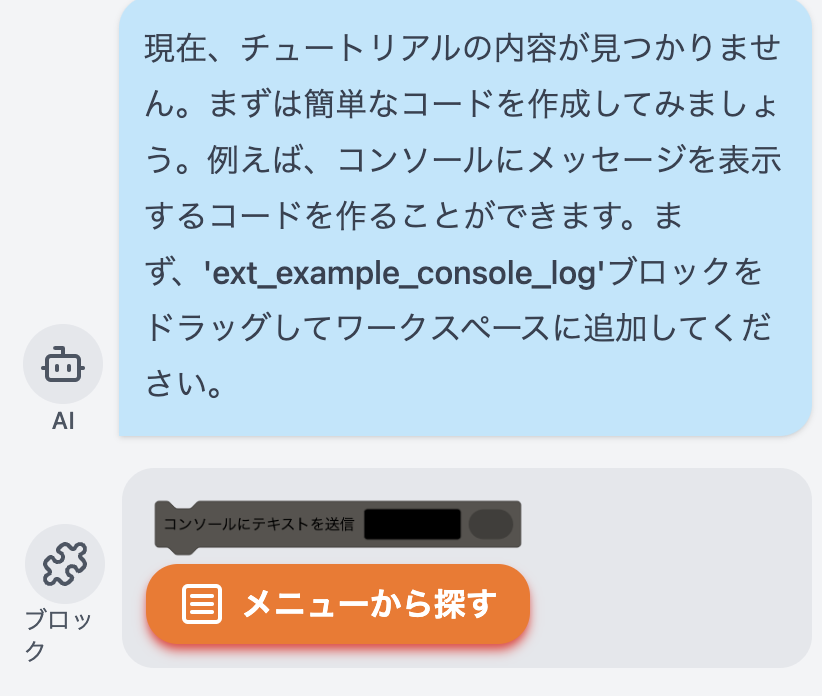 It’s not good to have the block name written in the chat.
To achieve this, we used the structured output from OpenAI’s API. During the creation of this feature, a new structured output mode was announced, which replaced JSON mode and significantly reduced the probability of errors.
Although I recall vaguely, the response from GPT looked something like this:
It’s not good to have the block name written in the chat.
To achieve this, we used the structured output from OpenAI’s API. During the creation of this feature, a new structured output mode was announced, which replaced JSON mode and significantly reduced the probability of errors.
Although I recall vaguely, the response from GPT looked something like this:
{
content: "Currently, the tutorial is..."
block: "ext_example_console_log"
toolbar: null
}
Current Specifications
However, this specification had issues: only one block can be selected. Moreover, since the text tends to become long, elementary school children often do not read everything. Therefore, we implemented a new system, in exchange for some reliability.
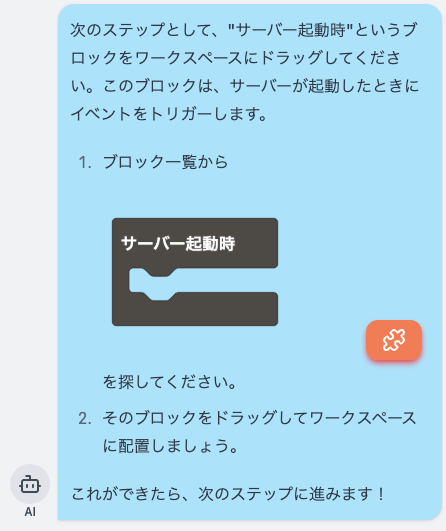 This system analyzes sentences from LLM that contain Markdown and replaces block names and block IDs within the workspace into an appropriate format for rendering. The current issue is that if block names or IDs are incorrect, they are displayed as plain text. However, thanks to this, unnecessary textual information has been greatly reduced, allowing for clearer responses.
LLMs merely recognize the user’s workspace as a string and return it as a string, but since users see it converted into visual information, I think it’s quite a cost-effective method.
This system analyzes sentences from LLM that contain Markdown and replaces block names and block IDs within the workspace into an appropriate format for rendering. The current issue is that if block names or IDs are incorrect, they are displayed as plain text. However, thanks to this, unnecessary textual information has been greatly reduced, allowing for clearer responses.
LLMs merely recognize the user’s workspace as a string and return it as a string, but since users see it converted into visual information, I think it’s quite a cost-effective method.
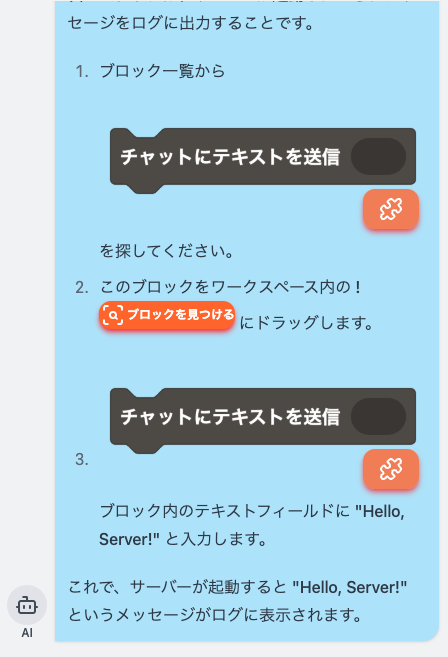 This allows for inline guidance for multiple blocks and workspace instructions.
With this, teachers do not have to point to the screen saying, “Here, look, here!” because AI can do all of that, making it very easy to understand.
Voice Mode
Additionally, we are also working on implementing this via voice.
Recently, a model called gpt4o-audio-preview (if I remember correctly) allows for these inputs and outputs to be replaced by audio.
While the Realtime API has been a hot topic, it had a critical flaw where it would forget all context when disconnected (I’m not sure if this is still the case now). Moreover, as it only supports voice-to-voice, I did not use it.
Audio-preview does not yet support structured output, so it sometimes returns broken JSON (proper error handling is necessary), but it enables dialogues in the way specified by users. For example, it can allow for input via voice and output via text.
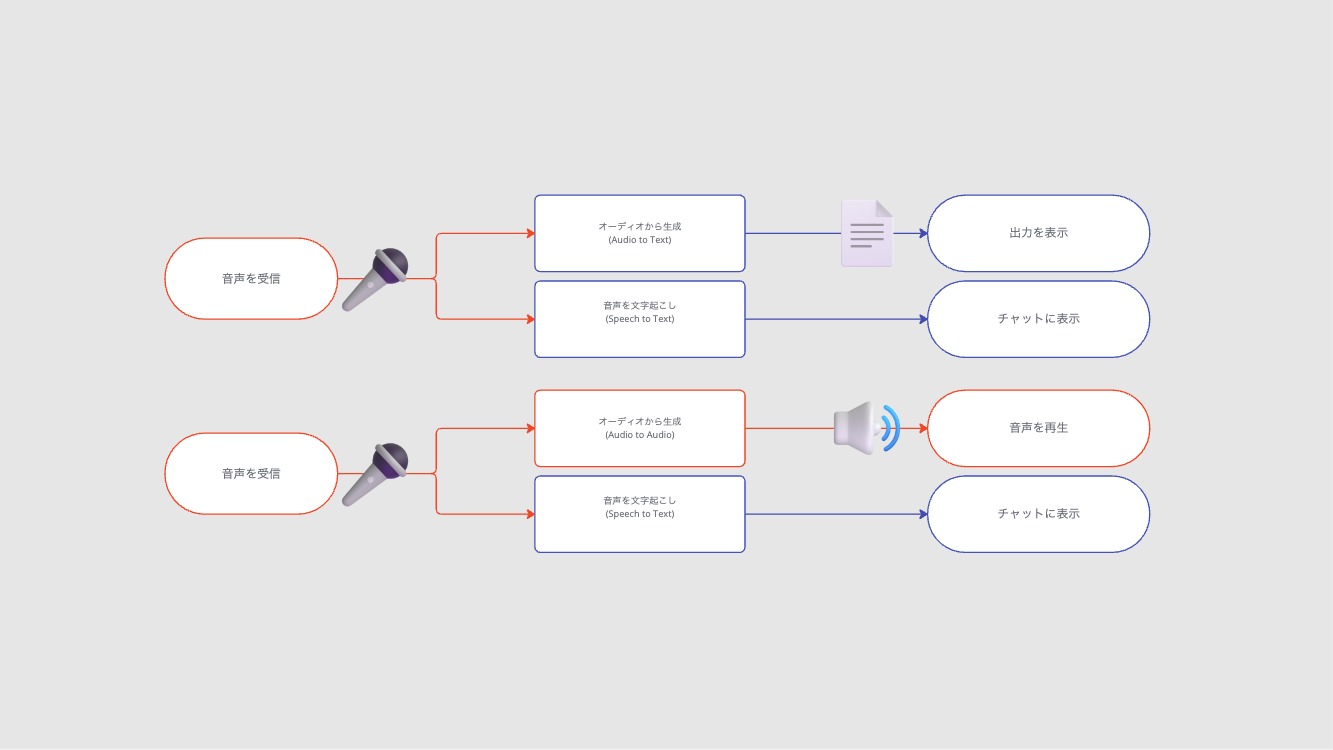 For voice input
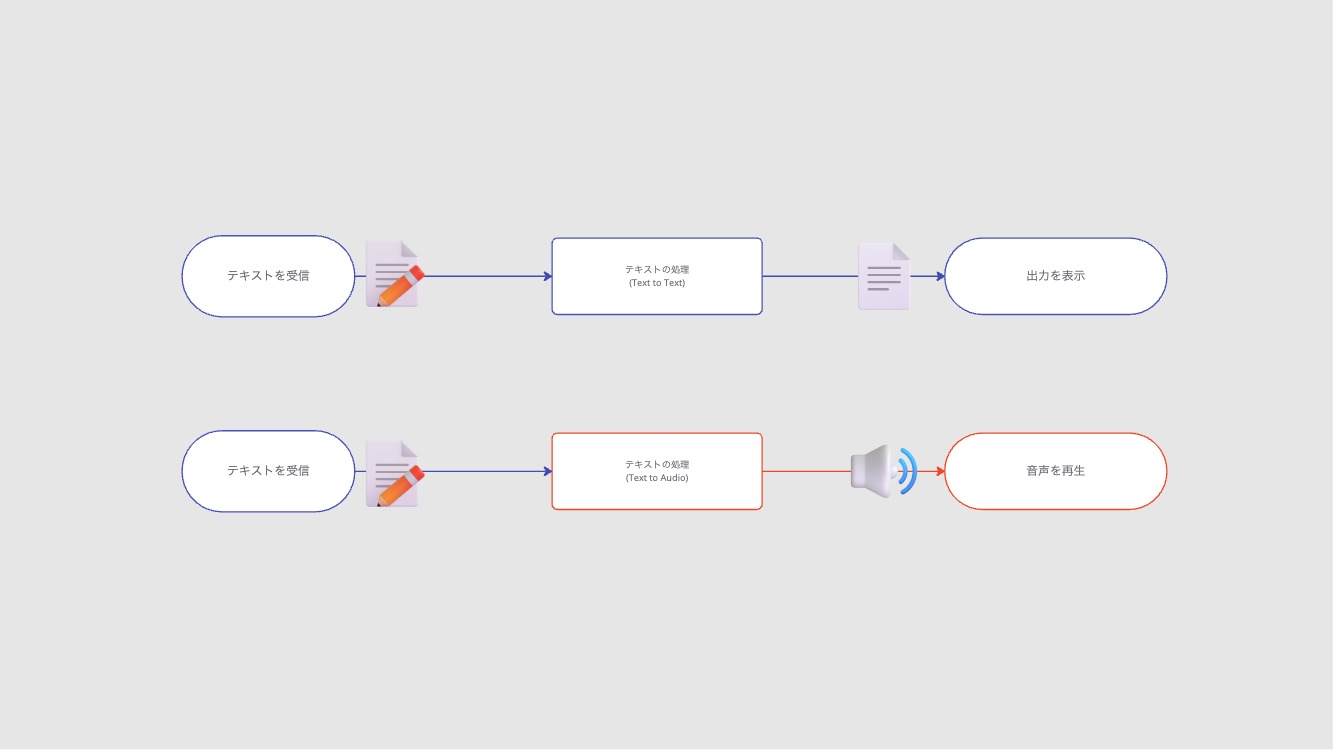 For text input
Nevertheless, I feel it may not yet be practical, so please try it at demo.tutoriallm.com if you’re interested.
For text input
Nevertheless, I feel it may not yet be practical, so please try it at demo.tutoriallm.com if you’re interested.
Conclusion
In conclusion, TutoriaLLM is currently in development and is unstable to the level of crashing daily… but a demo version is already available. Also, it’s fully open source and actively seeking contributors, so please take a look even though the code might be messy. https://github.com/TutoriaLLM/TutoriaLLM
If you are interested, I would be happy if you could follow me on social media! https://tokumaru.work/ja
0 people clapped 0 times
Related articles
🍳 XR's Use Might Be as a HUD - Let's Cook with AI
XR's Use Might Be as a HUD - Let's Cook with AI
I borrowed an inmo XR — Android-powered XR glasses — from Ukai, familiar from Mitou Junior, and did a little hackathon. After struggling with what to use it for, I built a cooking assistant to enjoy with an AI. I tried using the XR glasses to cook with AI, so I'll introduce that here.
💻 Let's Develop as a Team on GitHub
Let's Develop as a Team on GitHub
For those of you who have registered a GitHub account but don't use it because you're not a developer, here's a brief guide on how to use it.
🤖 Let's Read Google Sheets via API!
Let's Read Google Sheets via API!
This is a re-publication of an article I wrote on another site last year.
It's super easy. I'll...
🗓️ Thoughts on Life Logging Systems
Thoughts on Life Logging Systems
With the advancement of LLMs, it has become easier to verbalize human behavior and analyze conversations with others. However, I felt that none of it quite fit, so I thought about various aspects from both technical and usability perspectives.